


 Sea Beach
For a growing business, choosing the right software is not just a technology decision—it is a decision that can affect operational costs, productivity, customer experience, scalability, and long-term growth.
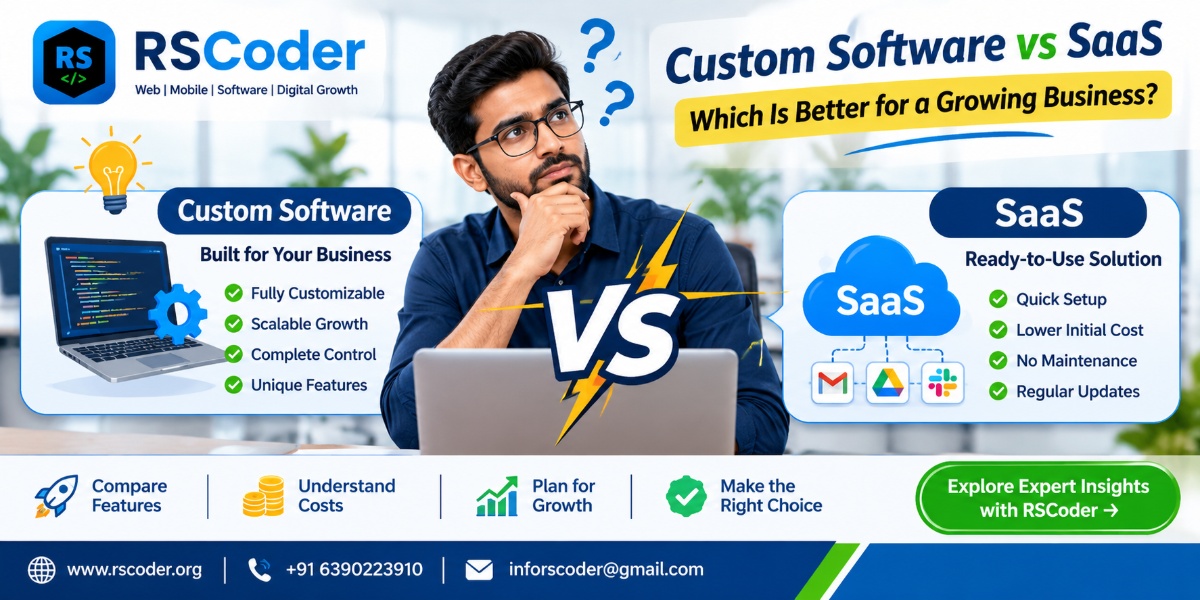
Many businesses start with SaaS (Software as a Service) because it is quick to set up, easy to use, and does not require significant upfront development. But as the business grows, standard software may not support every workflow, integration, reporting requirement, or operational need.
That raises an important question: Should your business continue using SaaS software, or invest in custom software development?
The answer depends on your business model, growth plans, processes, budget, and the level of control you need.
In this guide, we compare custom software vs SaaS, explain the real differences, explore costs and scalability, and help you decide which solution makes more sense for your business in 2026 and beyond.
What Is Custom Software Development?
Custom software development means building software specifically around your business requirements. Instead of changing your operations to fit an existing product, the software is designed around the way your business works.
A custom solution can include features, dashboards, user roles, integrations, automation, reports, and workflows selected according to your requirements.
For example, a logistics company might need:
-
Customer and vendor management
-
Shipment booking and tracking
-
Fleet and driver management
-
Real-time delivery updates
-
Automated invoices
-
Admin dashboards and business reports
A standard application may provide some of these features, but custom software can connect the entire workflow in one system.
Common examples of custom software include:
-
CRM and lead management systems
-
ERP and inventory management software
-
School and college management systems
-
Hospital and healthcare management platforms
-
Logistics and fleet management systems
-
Booking and appointment platforms
-
HR and payroll software
-
Customer and vendor portals
-
Business automation platforms
-
AI-powered business applications
What Is SaaS (Software as a Service)?
SaaS is software that businesses access over the internet, usually through a subscription. The software provider manages the infrastructure, updates, maintenance, and hosting.
Instead of developing an application from scratch, you subscribe to an existing product and use its available features.
Examples include CRM platforms, accounting tools, project management applications, email marketing platforms, and cloud-based collaboration software.
SaaS is popular because businesses can get started quickly without managing the entire technology infrastructure.
However, SaaS products are designed for a broad customer base. Their workflows and features may not perfectly match every company's requirements.
Custom Software vs SaaS: Key Differences
| Comparison | Custom Software | SaaS Software |
|---|---|---|
| Development | Built for your requirements | Ready-made product |
| Initial investment | Usually higher | Usually lower |
| Pricing | Project-based development and ongoing costs | Subscription-based |
| Customisation | High, based on scope | Limited to available options |
| Ownership | Depends on contract and IP agreement | Provider controls the platform |
| Deployment | Depends on project requirements | Usually quick |
| Integrations | Can be designed around your systems | Depends on available integrations |
| Scalability | Can be developed as requirements grow | Depends on provider's plans and limits |
| Maintenance | Your team or development partner manages it | Provider manages the platform |
| Data control | Can be designed around your data policies | Depends on provider and contract |
| Vendor dependency | Depends on technology and support arrangements | Generally higher |
| Best suited for | Unique or complex business processes | Standard business requirements |
The biggest difference is flexibility. Custom software is designed around your business, while SaaS provides a ready-made system that your business adapts to.
1. When Should a Growing Business Choose SaaS?
SaaS can be an excellent choice when your business needs standard functionality and wants to start quickly.
Consider SaaS if:
-
Your business is in its early stages.
-
You need a solution immediately.
-
Your workflows are relatively standard.
-
Your team does not need extensive customisation.
-
Your budget does not support a large development project.
-
Your chosen platform supports the integrations you require.
-
You are comfortable with subscription pricing and provider policies.
For example, a small business that needs basic accounting, email marketing, or project management may not need a custom application.
A ready-made platform can handle these requirements efficiently.
The important point: Do not build custom software simply because it sounds more advanced. If an existing platform solves your actual business problem, SaaS may be the smarter investment.
2. When Should a Business Invest in Custom Software?
Custom software becomes more valuable when standard applications start creating limitations.
You may need custom development when:
-
Your business follows specialised workflows.
-
Multiple departments use disconnected applications.
-
You need automation between different systems.
-
Your team spends too much time on manual operations.
-
You require advanced dashboards and reporting.
-
Your customers need a dedicated portal or mobile application.
-
Your subscription costs increase as users or usage grow.
-
Your business needs features that existing products do not provide.
Imagine an eCommerce business managing orders, inventory, vendors, payments, delivery partners, and customer support through separate platforms.
A custom business management system can connect these operations and provide a unified view of the business.
The objective is not simply to own software. It is to remove operational friction and create a system that supports the way the business grows.
3. Custom Software vs SaaS: Which Is More Cost-Effective?
Cost is one of the biggest factors when comparing these two approaches.
SaaS generally requires a lower initial investment. However, the long-term cost depends on subscriptions, user limits, add-ons, integrations, usage charges, and pricing changes.
Custom software generally requires a larger initial investment, followed by hosting, maintenance, support, security, and future development costs.
Example: Understanding the Long-Term Cost
Consider a business that needs a CRM system.
With SaaS, expenses may include:
-
Monthly or annual subscription
-
Additional user licences
-
Premium features
-
Integration charges
-
Data migration or setup services
With custom software, expenses may include:
-
Requirement analysis and development
-
UI/UX design
-
Hosting and infrastructure
-
Security and maintenance
-
Future upgrades and support
There is no universal rule that custom software is always cheaper over time. The financial outcome depends on the number of users, feature requirements, pricing structure, maintenance needs, and expected business growth.
A better way to compare costs: Calculate the total cost of ownership over three to five years rather than comparing only the initial price.
4. Which Is More Scalable: Custom Software or SaaS?
Scalability means your software can support increasing users, transactions, data, locations, and operational complexity.
SaaS platforms may offer different subscription plans and infrastructure capacity. This can be sufficient for businesses with predictable requirements.
However, you may encounter limitations involving:
-
User or storage limits
-
API usage restrictions
-
Workflow automation limits
-
Advanced reporting
-
Custom integrations
-
Platform-specific features
Custom software can be designed to support your expected growth, but scalability is not automatic. Architecture, database design, infrastructure, security, and development quality all matter.
For example, a startup planning to expand from one city to multiple locations may need multi-branch management, location-based permissions, centralised reporting, and separate operational dashboards.
If these requirements are central to the business model, a custom solution may provide greater long-term flexibility.
5. Custom Software vs SaaS for Data Security and Control
Business data can include customer information, financial records, employee details, transactions, inventory, and operational reports.
With SaaS, the provider manages much of the infrastructure and security environment. You should review its security documentation, data processing terms, access controls, backup policies, and compliance commitments.
With custom software, you can design security features around your business requirements, such as:
-
Role-based access control
-
Multi-factor authentication
-
Data encryption
-
Activity logs
-
Backup and recovery procedures
-
Permission-based dashboards
-
API authentication
-
Data retention policies
However, custom software does not automatically mean better security. It requires secure development practices, regular updates, monitoring, and responsible infrastructure management.
The right choice is the one that meets your organisation's actual security, privacy, and compliance requirements.
6. Can a Business Combine Custom Software and SaaS?
Yes. In many cases, a hybrid approach is more practical than choosing only one.
A business can use SaaS for standard operations and custom software for its specialised workflows.
For example:
-
SaaS accounting software for financial operations
-
Custom CRM for specialised sales processes
-
SaaS email marketing for campaigns
-
Custom customer portal for order tracking
-
Third-party payment gateway for transactions
-
Custom dashboard for consolidated business reporting
APIs and integrations can connect these systems where supported.
This approach allows a business to avoid rebuilding features that already work well while investing in custom development where it creates a meaningful advantage.
7. How AI Is Changing the Custom Software vs SaaS Decision
AI is changing how businesses manage repetitive tasks, customer communication, reporting, and decision-making.
Many SaaS platforms now include AI features, such as automated summaries, content assistance, forecasting, and workflow suggestions.
Custom software can also integrate AI capabilities around specific business processes.
For example, a business may build:
-
AI-powered customer support assistants
-
Automated lead qualification systems
-
Intelligent document processing
-
AI-based sales reporting
-
Internal knowledge assistants
-
Predictive inventory workflows
-
Automated customer follow-ups
The difference is not simply whether AI is available. It is how effectively AI fits into your actual operations.
A growing business should evaluate data quality, access permissions, integration options, accuracy, human review, and ongoing AI usage costs before adopting these features.
8. Real Business Scenarios: Which Option Makes More Sense?
| Business Requirement | Possible Better Fit | Why |
|---|---|---|
| Basic accounting | SaaS | Standard functionality |
| Simple project management | SaaS | Quick setup |
| Specialised ERP workflows | Custom software | Business-specific processes |
| Multi-vendor marketplace | Custom or hybrid | Complex roles and transactions |
| Standard email marketing | SaaS | Mature ready-made tools |
| Custom delivery management | Custom software | Specific logistics workflows |
| Basic customer relationship management | SaaS | Standard CRM features |
| Complex sales and service operations | Custom or hybrid | Specialised workflows |
| Multi-branch business management | Custom or hybrid | Centralised operational control |
These are starting points, not fixed rules. A SaaS platform with suitable configuration may handle complex requirements, while a custom project may be unnecessary for a simple process.
9. What Should You Check Before Choosing a Software Solution?
Before investing in any software, answer these questions:
-
Does the software support our current business processes?
-
Can it handle our expected growth over the next three to five years?
-
What is the complete cost, including subscriptions, development, integrations, and maintenance?
-
Can it connect with our existing applications?
-
Can we export our data if we change providers?
-
Are user roles and access permissions sufficient?
-
What happens if the provider changes its pricing or discontinues a feature?
-
Can the software support multiple branches, teams, or business units?
-
What level of technical support is available?
-
Will this solution reduce manual work and improve measurable business outcomes?
These questions help you evaluate software based on business value instead of choosing a product simply because it is popular.
10. The Future: Businesses Will Choose Software Based on Their Workflows
The future of business technology is not necessarily custom software replacing SaaS or SaaS replacing custom development.
Businesses are increasingly likely to use a combination of ready-made platforms, custom applications, APIs, cloud infrastructure, and AI-powered automation.
The important advantage will come from connecting technology to real business operations.
A growing company should not invest in custom development just to have its own application. It should invest when the solution can improve efficiency, provide better control, support a unique business model, or create a better customer experience.
Frequently Asked Questions
1. What is the main difference between custom software and SaaS?
Custom software is developed around a particular business's requirements, while SaaS is a ready-made application provided to multiple customers through a subscription or usage-based model.
2. Is custom software better than SaaS for small businesses?
Not always. SaaS is often suitable for small businesses with standard requirements and limited initial budgets. Custom software may be more appropriate when specialised workflows, integrations, or business processes cannot be handled effectively by existing platforms.
3. Is SaaS cheaper than custom software?
SaaS usually has a lower initial cost, but recurring subscriptions, additional users, premium features, and integrations can increase long-term expenses. Custom software has higher upfront development costs and ongoing maintenance expenses. Compare the total cost of ownership before deciding.
4. When should a company switch from SaaS to custom software?
Consider switching when your current platform repeatedly limits important workflows, creates expensive workarounds, cannot integrate with essential systems, or no longer supports your operational requirements.
5. Who owns custom software?
Ownership depends on the development agreement. Businesses should clearly define intellectual property rights, source-code access, third-party components, licensing, and ownership of deliverables in the contract.
6. Can custom software integrate with existing SaaS applications?
Yes. Custom applications can integrate with SaaS platforms through APIs, webhooks, and other supported integration methods. The available options depend on each platform's technical capabilities and access policies.
7. Is custom software more secure than SaaS?
Not automatically. Both approaches can be secure when properly managed. SaaS security depends partly on the provider's controls, while custom software requires secure architecture, development, hosting, maintenance, and monitoring.
8. Can startups benefit from custom software development?
Yes, particularly when technology is central to the startup's product or business model. However, validating the business idea with existing tools or an MVP can help avoid unnecessary development costs.
9. What is the difference between custom software and off-the-shelf software?
Off-the-shelf software is a ready-made product designed for a broad range of users. Custom software is developed to meet specific requirements and workflows. SaaS is one common way of delivering off-the-shelf software.
10. Should a growing business choose custom software, SaaS, or a hybrid model?
Choose SaaS for standard requirements, custom software for specialised processes, and a hybrid model when your business needs both ready-made functionality and tailored workflows.
Final Verdict: Custom Software or SaaS?
There is no single solution that is best for every growing business.
Choose SaaS when speed, standard features, and lower initial investment are your priorities.
Choose custom software when your business needs specialised workflows, deeper integrations, greater flexibility, or a technology platform built around its operations.
Choose a hybrid model when you want to combine reliable existing tools with custom-built capabilities.
The smartest software investment is not the one with the most features. It is the one that solves your business problems today and gives you room to grow tomorrow.
Build Software Around the Way Your Business Works
At RS Coder, we help businesses plan and develop technology solutions based on their operational requirements and growth objectives.
Our services include:
-
Custom Software Development
-
CRM, ERP and Business Management Systems
-
Web Application Development
-
Mobile App Development
-
API Integration and Automation
-
AI Integration and Business Automation
-
Ongoing Maintenance and Technical Support
Whether you need a custom business platform, a customer portal, a management system, or an integrated web and mobile application, the right starting point is understanding your requirements.
Discuss your software requirements with RS Coder.
🌐 www.rscoder.org
📞 +91 6390223910
✉️ inforscoder@gmail.com
Compare custom software and SaaS to understand their costs, scalability, flexibility, security, and long-term value. Discover the right software strategy for your growing business.
Custom Software vs SaaS: Which Is Better for a Growing Business?