


 Sea Beach
Businesses today generate huge amounts of information across sales, customers, finance, inventory, employees, operations and customer support. Managing all of this through spreadsheets, disconnected applications and manual processes can make it difficult to maintain accurate data and efficient workflows.
This is where ERP and CRM software become important.
Although ERP and CRM are often discussed together, they solve different business problems.
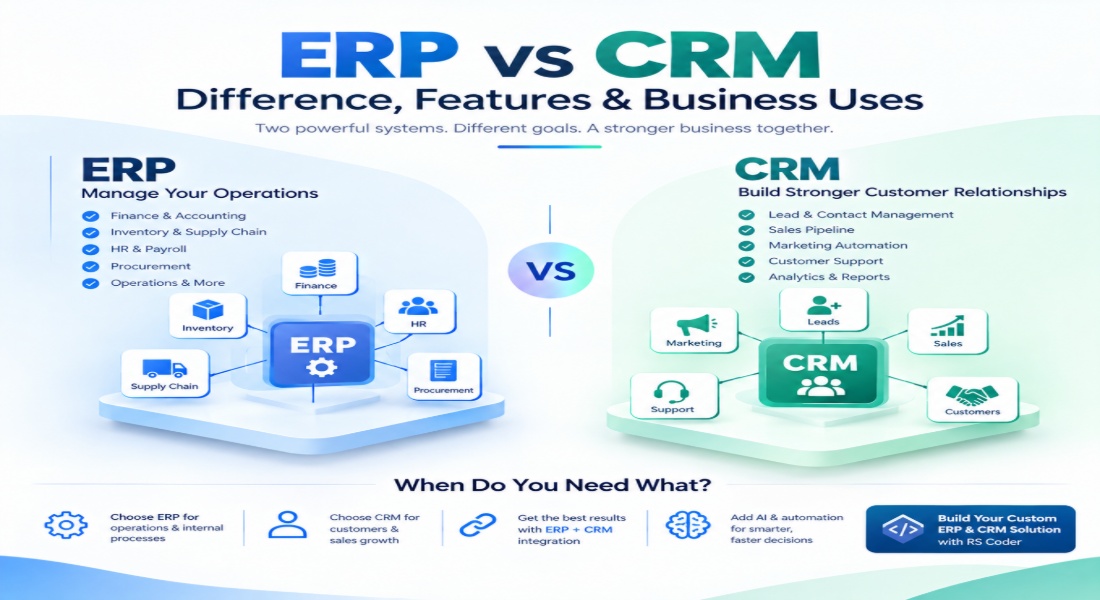
A CRM (Customer Relationship Management) system primarily focuses on customers, leads, sales, marketing and service. An ERP (Enterprise Resource Planning) system focuses on the internal operations that keep a business running, including finance, inventory, procurement, HR and supply chain processes.
For many growing organizations, the question isn't simply “ERP or CRM?”. In many cases, businesses can benefit from integrating both systems so customer-facing and back-office data can work together.
What Is ERP?
ERP stands for Enterprise Resource Planning.
An ERP system connects important business operations through a centralized software platform. Depending on the organization, ERP can cover finance, accounting, procurement, inventory, supply chain, human resources, project management, manufacturing and other operational functions.
Instead of keeping financial information in one application, inventory in another and employee records somewhere else, an ERP can bring these workflows and their data into a connected environment.
Common ERP Modules
A modern ERP system may include:
- Finance & Accounting
- Inventory Management
- Procurement
- Supply Chain Management
- Human Resources
- Payroll
- Manufacturing
- Warehouse Management
- Project Management
- Order Management
- Business Intelligence
- Reporting & Analytics
The exact modules depend on the company's industry and requirements.
What Is CRM?
CRM stands for Customer Relationship Management.
CRM software is designed around the customer lifecycle. It helps businesses organize information about prospects and customers, track interactions, manage leads and opportunities, support sales teams, and coordinate customer service activities.
A CRM can give sales, marketing and customer-service teams a shared view of customer activity.
Common CRM Features
A CRM system can include:
- Lead Management
- Contact Management
- Sales Pipeline
- Opportunity Management
- Customer Communication
- Marketing Automation
- Email Integration
- Customer Support
- Follow-up Management
- Appointment Management
- Sales Forecasting
- Analytics & Reports
- Customer Portals
- AI-powered insights
Modern CRM platforms can also incorporate AI to help analyze customer information and support sales, service and marketing workflows.
ERP vs CRM: The Main Difference
The simplest way to understand the difference is:
CRM manages customer relationships.
ERP manages business operations.
CRM generally serves front-office functions such as sales, marketing and customer service, while ERP primarily supports back-office functions such as finance, HR, procurement and operations.
| Area | ERP | CRM |
|---|---|---|
| Primary focus | Business operations | Customer relationships |
| Main users | Finance, HR, operations, procurement | Sales, marketing, customer service |
| Customer leads | Limited/connected capability | Core functionality |
| Sales pipeline | May be integrated | Core functionality |
| Accounting | Core functionality | Usually limited |
| Inventory | Core functionality | Usually limited |
| HR & Payroll | Common ERP module | Usually not core |
| Procurement | Core functionality | Not usually core |
| Marketing automation | Limited/optional | Core functionality |
| Customer support | May be available | Core functionality |
| Business reporting | Operational & financial | Sales & customer analytics |
The two systems therefore overlap in some areas but are not interchangeable.
Key Features of ERP Software
1. Financial Management
ERP software can centralize accounting, invoices, expenses, payments, budgeting and financial reporting.
This helps businesses maintain better visibility into their financial operations.
2. Inventory Management
Businesses dealing with physical products can use ERP to track:
- Stock levels
- Warehouses
- Purchase orders
- Product movement
- Reorder levels
- Sales orders
This can connect inventory information with purchasing and order workflows.
3. Human Resource Management
ERP platforms can include employee management, attendance, payroll, leave management and workforce information.
4. Procurement
ERP can help organizations manage suppliers, purchase requests, purchase orders and procurement workflows.
5. Business Analytics
Modern ERP platforms increasingly use real-time analytics and AI-powered capabilities to help organizations understand operational data and support decision-making.
Key Features of CRM Software
1. Lead Management
CRM systems help businesses capture and organize leads from different channels.
Sales teams can track where leads came from, their current status and the next action required.
2. Sales Pipeline Management
A CRM can provide a visual view of opportunities as they move through different stages of the sales process.
3. Customer Communication
Businesses can maintain records of calls, emails, meetings and other customer interactions.
4. Marketing Automation
CRM platforms can support campaigns, customer segmentation, email workflows and lead nurturing.
5. Customer Service
Support teams can manage customer requests, complaints, tickets and service histories from a centralized system.
CRM systems are designed to give teams a more connected view of customer interactions throughout the customer lifecycle.
Business Uses of ERP
ERP can be especially useful when a company needs to connect multiple internal departments.
For example, imagine a manufacturing company receiving a large customer order.
The order can affect:
Sales → Inventory → Procurement → Production → Warehouse → Finance → Delivery
Without connected systems, employees may have to manually transfer information between departments.
With an integrated ERP environment, related processes can share data and workflows.
ERP is therefore commonly used across:
- Manufacturing
- Retail
- E-commerce
- Logistics
- Healthcare
- Education
- Construction
- Real Estate
- Distribution
- Hospitality
- Professional Services
Microsoft describes ERP as a connected environment for core processes such as finance, supply chain, manufacturing, HR and procurement.
Business Uses of CRM
CRM is particularly valuable when customer acquisition, sales and retention are major priorities.
For example:
A visitor submits an enquiry → lead is created → salesperson follows up → opportunity is created → proposal is sent → deal is won → customer receives support.
A CRM can help organize this entire customer journey.
Businesses commonly use CRM for:
- Lead generation
- Sales management
- Customer retention
- Marketing campaigns
- Customer support
- Account management
- Follow-up automation
- Sales forecasting
- Customer analytics
For companies with large sales teams, CRM can become the central system for managing customer relationships.
Can ERP and CRM Work Together?
Yes.
In fact, integrating ERP and CRM can provide a more complete picture of the business.
Consider an e-commerce company.
The CRM can manage:
- Customer information
- Leads
- Marketing
- Sales interactions
- Customer support
The ERP can manage:
- Orders
- Inventory
- Billing
- Finance
- Procurement
- Fulfillment
When the systems are connected, sales teams can potentially access relevant inventory or order information while operational teams can work with connected customer and transaction data.
Oracle notes that integrating ERP and CRM can reduce data silos and help businesses connect front-office and back-office information.
ERP vs CRM in the AI Era
The next generation of business software is becoming increasingly intelligent.
Modern ERP and CRM platforms are incorporating:
- Artificial Intelligence
- Predictive Analytics
- Automation
- AI Assistants
- AI Agents
- Intelligent Reporting
- Workflow Automation
- Natural Language Interfaces
Microsoft's current Dynamics 365 platform, for example, combines AI-powered ERP and CRM applications and includes autonomous-agent capabilities across business processes.
This creates new possibilities.
A CRM could help identify which leads require follow-up.
An ERP could help identify unusual inventory patterns.
AI agents could potentially connect information across systems and automate multi-step workflows.
The result is a shift from simply storing business information to building intelligent business operations.
Should Your Business Choose ERP, CRM or Both?
There is no single answer for every organization.
A business primarily struggling with:
- Lead management
- Sales tracking
- Customer communication
- Marketing
- Customer support
may need CRM capabilities.
A business struggling with:
- Finance
- Inventory
- Procurement
- HR
- Supply chain
- Operations
may need ERP capabilities.
Businesses dealing with both customer-facing and operational complexity may benefit from ERP + CRM integration.
The right architecture depends on the company's size, industry, workflows, existing software, integrations, data requirements and growth plans.
Custom ERP & CRM Development for Modern Businesses
Off-the-shelf software can be useful, but every business has different processes.
A company may need:
- Custom ERP Software
- Custom CRM Software
- ERP + CRM Integration
- AI-Powered CRM
- AI-Powered ERP
- Customer Portal
- Employee Portal
- Inventory Management
- HR & Payroll
- Accounting Integration
- API Integration
- Payment Gateway Integration
- Business Analytics
- Automated Workflows
A custom solution can be designed around the organization's actual processes instead of forcing teams to completely change their workflows around generic software.
Build Smarter Business Software with RS Coder
At RS Coder, we develop custom business software solutions designed around specific operational and customer-management requirements.
Our solutions can include:
ERP Development
Custom ERP platforms for finance, HR, inventory, procurement, operations and business management.
CRM Development
Custom CRM systems for leads, sales pipelines, customer management and support.
ERP + CRM Integration
Connect customer information with orders, inventory, billing, finance and operational workflows.
AI Integration
Add AI-powered automation, intelligent insights and AI assistants to existing business software.
API Integration
Connect ERP, CRM, payment gateways, third-party applications and other business platforms.
Custom Software Development
Build scalable web-based business applications around your unique workflows.
Final Thoughts
ERP and CRM are not competing versions of the same software.
CRM is primarily customer-focused. ERP is primarily operations-focused.
CRM helps businesses manage relationships, sales and customer experiences, while ERP connects the internal processes, resources and transactions that keep the organization running.
For many growing companies, the real opportunity is connecting both.
CRM + ERP + APIs + AI + Automation can create a more connected digital business environment where customer information and operational data work together.
The future of business software isn't just about having more tools.
It's about having connected, intelligent systems that work together.
Connect with RS Coder
Website: www.rscoder.org
Email: inforscoder@gmail.com
Call: +91 6390223910
ERP vs CRM: Understand the key differences between ERP and CRM, their features, business uses, and how they work together.
ERP vs CRM: Difference, Features & Business Uses