

 Sea Beach
Which Business Software Does Your Company Actually Need?
As a business grows, managing sales leads, employee records, inventory, accounts, payroll and daily operations through spreadsheets and disconnected tools becomes increasingly difficult. Information gets duplicated, follow-ups are missed, reporting takes longer, and managers struggle to see what is happening across departments.
This is where ERP, CRM and HRMS software can make a measurable difference. Although these systems are sometimes grouped under business management software, each serves a different purpose.
An ERP system manages business operations and resources. CRM software helps businesses acquire and retain customers. An HRMS simplifies employee management, attendance, payroll and HR workflows.
The right choice depends on your biggest operational challenge, your business model and your future growth plans.
Looking for a business software solution tailored to your workflow? RSCoder helps businesses plan and develop custom software, ERP platforms, CRM solutions and integrated business applications.
What Is ERP Software?
ERP stands for Enterprise Resource Planning. It is business management software designed to connect core operations through a centralized system.
Instead of maintaining separate records for accounting, inventory, purchasing and sales, an ERP system helps authorized teams work with connected information and standardized workflows.
Key ERP software features
-
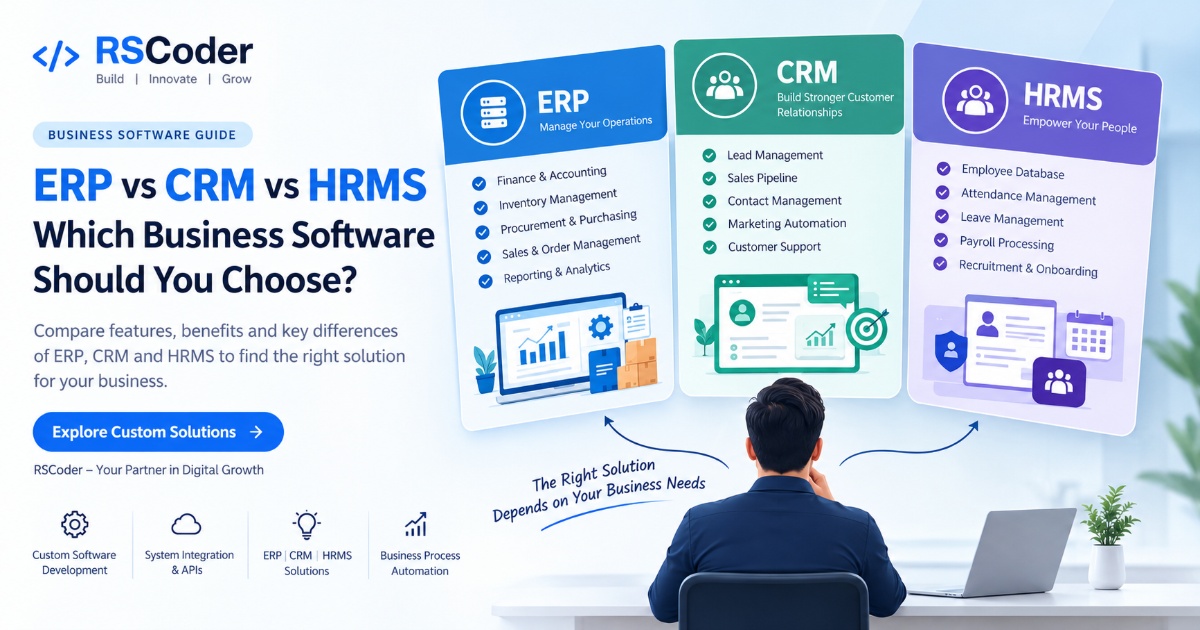
Finance and accounting: Manage financial transactions, expenses, invoices and reporting.
-
Inventory management: Track stock levels, warehouse movements and product availability.
-
Purchase and procurement: Organize purchase orders, supplier information and approvals.
-
Sales and order management: Coordinate orders, billing and operational fulfilment.
-
Production planning: Help manufacturers manage materials, production workflows and schedules.
-
Reporting and analytics: Provide management with consolidated operational information.
-
HR and payroll modules: Support employee-related processes when included in the ERP platform.
Who should choose ERP software?
ERP is particularly useful for manufacturers, wholesalers, distributors, retailers, logistics businesses and growing companies with complex internal operations.
Example: A distribution company receives an order from a customer. Its ERP can help connect order processing, stock availability, purchasing, invoicing and financial records. This reduces the need for teams to update several disconnected systems manually.
However, ERP implementation requires careful planning. Businesses should map their existing processes, clean their data and decide which modules they actually need before selecting a solution.
What Is CRM Software?
CRM stands for Customer Relationship Management. It helps businesses organize customer information, track prospects and manage interactions throughout the sales journey.
A CRM gives sales, marketing and customer support teams a shared view of leads, conversations, opportunities and follow-up activities.
Key CRM software features
-
Lead management: Capture and organize leads from websites, advertising campaigns and other channels.
-
Sales pipeline management: Track prospects from initial enquiry to conversion.
-
Contact management: Maintain customer profiles and interaction histories.
-
Follow-up automation: Schedule reminders and automate routine sales activities.
-
Marketing integration: Connect campaign data and customer engagement workflows.
-
Customer support: Manage enquiries, complaints and service requests.
-
Sales reporting: Monitor pipeline activity, conversion rates and sales performance.
Who should choose CRM software?
CRM software is valuable for digital marketing agencies, real estate companies, B2B service providers, educational consultancies, sales teams, eCommerce businesses and organizations that generate enquiries regularly.
Example: A website receives 100 enquiries from multiple campaigns. A CRM can help assign leads to sales representatives, record follow-up dates, track conversations and identify which enquiries turn into customers.
A CRM does not automatically guarantee more sales. Its value depends on data quality, team adoption, sensible follow-up processes and the quality of the leads entering the system.
What Is HRMS Software?
HRMS stands for Human Resource Management System. It helps organizations manage employee information and recurring HR processes from a centralized platform.
An HRMS can replace multiple spreadsheets used for attendance, leave applications, employee documentation and payroll preparation.
Key HRMS software features
-
Employee database: Maintain employee profiles, documents and employment details.
-
Attendance management: Record attendance, working hours and supported shift schedules.
-
Leave management: Automate leave applications, approvals and balances.
-
Payroll processing: Calculate payroll using configured salary structures and approved attendance data.
-
Recruitment and onboarding: Organize candidate information and new-employee tasks.
-
Performance management: Support reviews, goals and appraisal workflows.
-
Employee self-service: Allow employees to access relevant records and submit requests.
-
HR reporting: Generate workforce reports and monitor HR processes.
Payroll and statutory compliance capabilities depend on the selected software, its configuration and the jurisdictions it supports.
Who should choose HRMS software?
HRMS is useful for growing businesses, staffing agencies, manufacturing companies, retail chains, IT companies and organizations managing employees across several teams or locations.
Example: When an employee submits a leave request, the HRMS can route it to the appropriate manager, update approved leave balances and provide relevant attendance information for payroll processing.
The result is a more organized HR workflow with fewer repetitive administrative tasks.
ERP vs CRM vs HRMS: Key Differences
The main difference is the business problem each system is designed to solve.
| Feature | ERP | CRM | HRMS |
|---|---|---|---|
| Primary purpose | Manage business operations | Manage customer relationships | Manage employees |
| Main users | Finance, operations, procurement | Sales, marketing, support | HR, payroll, employees |
| Core data | Transactions, inventory, accounts | Leads, contacts, opportunities | Employee records, attendance |
| Main functions | Accounting, stock, purchasing | Lead tracking, sales pipeline | Payroll, leave, recruitment |
| Primary business goal | Operational efficiency | Revenue and customer retention | Workforce administration |
| Common users | Manufacturers, distributors | Agencies, sales-driven businesses | Companies with growing teams |
The systems may overlap in areas such as reporting, employee records and financial workflows. Actual functionality varies by product and configuration, so compare modules rather than relying only on the software label.
ERP vs CRM vs HRMS: Which One Should You Choose?
The easiest way to choose is to start with the problem costing your business the most time, money or missed opportunities.
Choose ERP if your operations are disconnected
Consider ERP when inventory records are inaccurate, procurement approvals are slow, financial information is scattered or multiple departments struggle to coordinate orders and resources.
Choose CRM if leads and customer follow-ups are being missed
Consider CRM when enquiries arrive from several channels, sales teams lack visibility into deal progress or management cannot reliably identify which activities produce customers.
Choose HRMS if employee administration is becoming difficult
Consider HRMS when attendance, leave, employee documentation and payroll preparation involve too much manual work.
Do you need all three?
Not necessarily. A small service business might benefit most from CRM first. A growing company with complex inventory and accounting workflows might prioritize ERP. A company struggling with employee administration might start with HRMS.
As the business grows, these systems can be integrated or replaced with a broader platform where appropriate. The goal is not to buy every software category; it is to solve the right problems in the right order.
Can ERP, CRM and HRMS Work Together?
Yes. Integrating the systems can reduce duplicate data entry and improve coordination between departments.
For example, consider a company that uses CRM to manage sales opportunities, ERP to process orders and financial transactions, and HRMS to manage employees.
A connected workflow might look like this:
-
A sales representative records a qualified opportunity in CRM.
-
After the deal is confirmed, approved customer and order information moves into ERP through a supported integration.
-
ERP manages fulfilment, inventory and invoicing.
-
HRMS continues managing employee records, attendance and payroll.
-
Management reviews relevant reports from connected systems, subject to permissions and data availability.
APIs and integration services can connect compatible platforms, but the exact workflow depends on available interfaces, data structures, security requirements and business rules.
Businesses should define which system owns each type of data before integration. Otherwise, inconsistent records and conflicting updates can create more problems instead of fewer.
What Should You Check Before Selecting Business Software?
Before investing in ERP, CRM or HRMS software, evaluate the following factors:
-
Business requirements: Document the processes that need improvement.
-
Essential features: Separate must-have functions from optional features.
-
Ease of use: Choose workflows your employees can realistically adopt.
-
Integration capabilities: Check compatibility with existing accounting, payment, communication and reporting tools.
-
Security and access control: Review permissions, backups, audit logs and data protection practices.
-
Scalability: Ensure the solution can accommodate future users, locations and workflows.
-
Implementation and support: Assess migration, training, maintenance and ongoing technical support.
-
Total cost of ownership: Consider subscriptions or licensing, implementation, customization, integrations, training and maintenance.
For businesses with unusual workflows, a custom software development approach may be appropriate when existing products cannot meet essential requirements without excessive workarounds.
How RSCoder Can Help Your Business Choose the Right Solution
Choosing software is only the first step. The bigger challenge is ensuring it fits the way your business actually operates.
RSCoder provides custom software development services for businesses looking to build, integrate or improve digital systems. Depending on project requirements, a solution can include ERP modules, CRM workflows, HR and payroll functions, dashboards, APIs and business process automation.
Our approach can begin with identifying manual processes, defining essential features and mapping how information should move between departments.
Whether you need a CRM to manage enquiries, an ERP to coordinate business operations or an HRMS to streamline employee administration, the right solution should be built around clear requirements rather than unnecessary features.
Ready to discuss your business software requirements?
Visit rscoder.org to explore RSCoder's custom software development services and discuss a solution aligned with your business goals.
Frequently Asked Questions
1. What is the main difference between ERP, CRM and HRMS?
ERP manages internal business operations and resources, CRM manages customer relationships and sales activities, and HRMS manages employee information and HR processes.
2. Which is better for a small business: ERP or CRM?
It depends on the main challenge. Choose CRM if lead management and customer follow-ups are the priority. Choose ERP if accounting, inventory, purchasing and other operational processes need to work together.
3. Is HRMS part of ERP software?
Some ERP platforms include HR and payroll modules, while others integrate with a separate HRMS. The available functions depend on the product and its configuration.
4. Can ERP and CRM be integrated?
Yes. Compatible ERP and CRM systems can exchange customer, order and other approved business data through APIs or supported connectors. Integration should include clear data ownership and access controls.
5. What features should business management software include?
Core features depend on business needs but may include reporting, user permissions, workflow automation, dashboards, data management, integrations and secure access. ERP, CRM and HRMS each require their own specialized modules.
6. Should a business buy ready-made software or develop a custom solution?
Ready-made software can be suitable when its features match existing processes. Custom development may be worth considering when the business needs specialized workflows, industry-specific functionality or integrations that standard products do not adequately support.
7. Can one custom platform include ERP, CRM and HRMS?
Yes. A custom platform can combine modules for operations, customers and employees. However, requirements, permissions, integrations, reporting and maintenance must be planned carefully to keep the system manageable.
Conclusion
ERP vs CRM vs HRMS is not simply a comparison of three software products. It is a decision about which part of your business needs better systems and processes.
Choose ERP for connected operations, CRM for customer relationships and sales management, and HRMS for employee administration. If your business has needs across all three areas, evaluate whether integrated products or a unified custom platform will provide the best fit.
Start with your biggest operational challenge, prioritize essential features and plan for future integration. With the right software strategy, businesses can reduce repetitive work, improve visibility and create more consistent workflows as they grow.
Build smarter business workflows with RSCoder.
Contact RSCoder to discuss custom ERP, CRM, HRMS and business software development requirements.
Compare ERP vs CRM vs HRMS software to understand their features, benefits, key differences, and which business management solution is right for your company. Discover how RSCoder helps businesses streamline operations with custom software development and integration.
ERP vs CRM vs HRMS: Which Business Software Should You Choose?